
What is "Sign in with a passkey"?
A passkey is a modern replacement for a password. Instead of typing something you have to remember, you sign in the same way you unlock your phone or computer: with your fingerprint, your face, or your device's screen-lock PIN.
Why passkeys matter
Passwords are a hassle, and they're also the weakest link in most account security. They get forgotten, reused across sites, guessed, and stolen in data breaches. Passkeys fix most of these problems:
- Nothing to remember. No more forgotten passwords or reset emails.
- Faster sign-in. One touch or glance, and you're in.
- Much safer. A passkey can't be guessed, reused, or leaked from a website's database. It also can't be tricked out of you by a fake "look-alike" website, which is how many phishing scams work.
How it works
When you create a passkey, your device makes a matching pair of digital keys. One stays securely on your device, and the other is stored with us. When you sign in, your device proves it holds the right key after you confirm it's really you with a fingerprint, face scan, or PIN.
Your fingerprint or face never leaves your device, and we never see it or store it. Your device is only confirming to itself that it's you.
Frequently asked questions
Do I still need my password?
You will still need a password to create your account, but after you have set up a passkey you will not need to use it. Instead, you can simply click on the "Sign in with a passkey" button on the login page.
Is it safe to use my fingerprint or face?
Yes. Your biometric information stays on your device and is never sent to us or anyone else. If you'd rather not use biometrics, you can use your device's PIN or pattern instead.
What if I get a new phone or computer?
Most passkeys are saved to your account with Apple, Google, Microsoft, or your password manager (such as Bitwarden), so they're available on your new device once you sign in there. If not, you can sign in another way and create a new passkey in a minute or two. When you create your passkey on our site, you will receive a set of recovery codes. Copy those to a safe place, as you can also use them to log in later if you are unable use your passkey.
Can I use my passkey on more than one device?
Yes. Passkeys usually sync across the devices you're signed into with the same Apple, Google, or Microsoft account. You can also create a separate passkey on each device you use.
What if I use a shared or public computer?
Passkeys are best on devices you own. On a shared computer, you can often sign in by scanning a QR code with your phone, which lets your phone approve the sign-in without saving anything on the shared device.
What if someone else knows my phone's PIN?
Your device PIN protects your passkey, so keep it private, just as you would for your bank card. If someone else has access to your unlocked device, they could use your passkeys.
Does it cost anything?
No. Passkeys are built into modern phones, tablets, and computers at no charge.
I'm still not sure. Do I have to set one up?
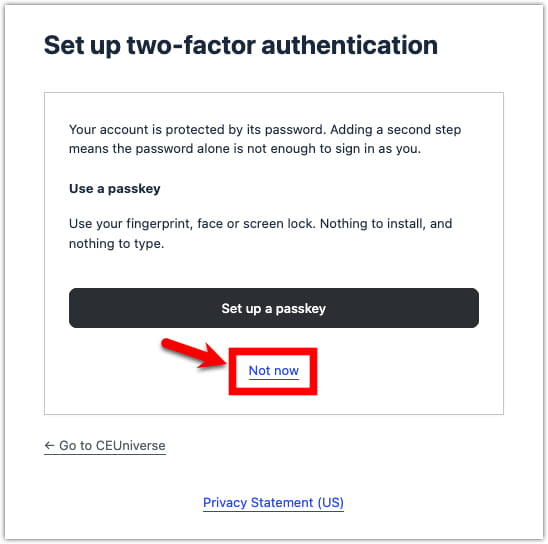
No. Passkeys are optional, and you can keep signing in the way you do now. We recommend them because they're faster and more secure. If you do not want to use a passkey, though, you can simply click the "Not now" link below the prompt to set it up:
Who can I contact if I have trouble?
You can reach out to our helpdesk at any time using the "help" button on our site or be emailing us directly at [email protected].